My Projects
KB2URI Pi SDR Dashboard
The KB2URI Pi SDR Dashboard is an active home-lab and amateur-radio project that turns a Raspberry Pi and SDRplay receiver into a remote SDR monitoring, FT8 activity, and station-awareness dashboard.
The current system provides a lightweight browser interface for monitoring SDR receiver health, live audio, waterfall activity, FT8 decode activity, propagation patterns, and operating conflicts with the main station radio. It is designed for 24/7 low-power operation and practical remote access from desktop and mobile devices.
Current Features
- Responsive desktop and mobile dashboard interface
- Live SDR audio stream and compact waterfall display
- Smart FT8 band scanning with clean 15-second cycle timing
- 6 meter and 2 meter FT8 activity checks with visual and audio alerts
- Radio Heard protection to avoid monitoring on the same band as the main operating radio
- Manual SDR receive control for frequency, mode, and squelch
- System Health, Radio Status, Live Audio, and Manual Control dashboard cards
- Recent decode map with optional path lines and Maidenhead grid overlay
- Hourly and daily band-performance heatmaps
- Browser alert sounds with repeat reminders while alerts remain active
- Automatic SDRplay device selection when supported receiver hardware is changed
- Recovery packaging with checksums and safe retention of known-good baselines
Platform Components
- Raspberry Pi 4
- SDRplay RSP-series receiver hardware
- SoapySDR and SDRplay API support
- GQRX, Hamlib rigctld, WSJT-X, and JT9 integration
- Python Flask dashboard and API
- PulseAudio-based live audio routing
- Linux systemd service automation and watchdogs
- Custom shell, Python, HTML, CSS, and JavaScript tooling
Project Direction
The next development phase is focused on turning the working station-specific system into a more reusable SDR appliance. Planned improvements include a cleaner installer, configuration CLI or terminal UI, better separation between station-specific settings and application logic, and support for additional radios and SDR receivers.
This project is both a practical station tool and a development platform for experimenting with remote SDR monitoring, digital-mode awareness, propagation visualization, and resilient Raspberry Pi radio services.
DXPED SpotCollector Package
The DXPED SpotCollector Package is a shareable Windows PowerShell automation project for DXLab Suite users who want SpotCollector to highlight active DXpeditions, special-event activity, and wanted-band opportunities without manually rebuilding filters.
The package was built around DXLab SpotCollector and DXKeeper, with automation that can read the local DXKeeper log database, compare worked and confirmed status by band and mode, and update SpotCollector filtering so relevant activity is easier to find during operating events.
Features
- PowerShell-based automation for DXLab Suite environments
- SpotCollector filter updates for active operating targets
- DXKeeper log lookup using the Microsoft ACE/OLEDB provider
- Club Log DXpeditions data support for current DXpedition awareness
- Worked, needed, and confirmed-credit comparison by band and mode
- Scheduled Task support for automatic refreshes
- Manual refresh option for operators who prefer on-demand updates
- Designed to be packaged and shared with other amateur radio operators
Use Case
This project is intended for operators who use DXLab Suite as their logging and spotting environment and want a repeatable way to keep SpotCollector aligned with current DXpedition or special-event activity. It reduces the amount of manual checking needed during events and helps surface stations that may matter for band fills, mode fills, or operating goals.
Platform Components
- Windows PowerShell
- DXLab Suite SpotCollector
- DXLab Suite DXKeeper
- Microsoft ACE/OLEDB database provider
- Windows Task Scheduler
- Club Log DXpeditions data
The project is being organized as a practical operator package with scripts, setup notes, scheduled-refresh guidance, and troubleshooting steps so it can be adapted by other DXLab users.
Download SpotCollector DXPED FilterPanasonic WV-TW370 Body Worn Camera Support
Refurbishing surplus Panasonic WV-TW370 body worn cameras obtained from a local law enforcement agency. Units were tested to identify working batteries, replacement battery needs, and usable accessories.
These resources are provided for archival, maintenance, and lawful support purposes. Users are responsible for ensuring they are authorized to configure, reset, possess, or operate any body worn camera equipment and related software.
Panasonic BWC Configuration Tool
Download the Panasonic Body Worn Camera Configuration Tool for Panasonic WV-TW370 and related Arbitrator BWC systems.
Download Setup_BWCConfigTool-3.2.12.5.exePanasonic AV Viewer Software
Download the Panasonic AV Viewer software package for use with Panasonic WV-TW370 Body Worn Cameras and related Arbitrator systems.
Download AVViewer 2.9.74.32.zipReset Procedure for BWCs
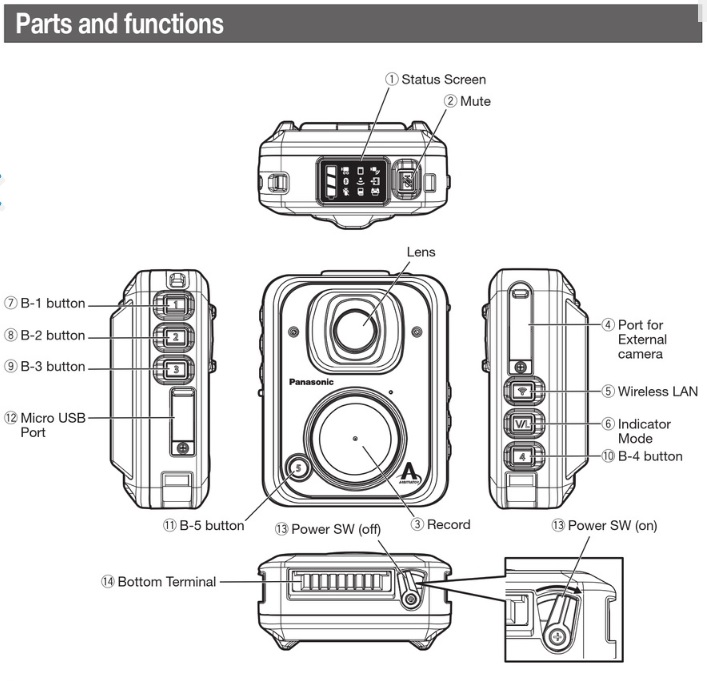
Press and hold the B-1, B-5, and Record buttons, then switch on power to the device. This will reset the BWC to factory settings. Upon connecting to the BWC Config Tool, you will be prompted to create a new administrator login and password. If the device asks for an admin username and password, the defaults are admin and 12345.
Please see the image below for reference.